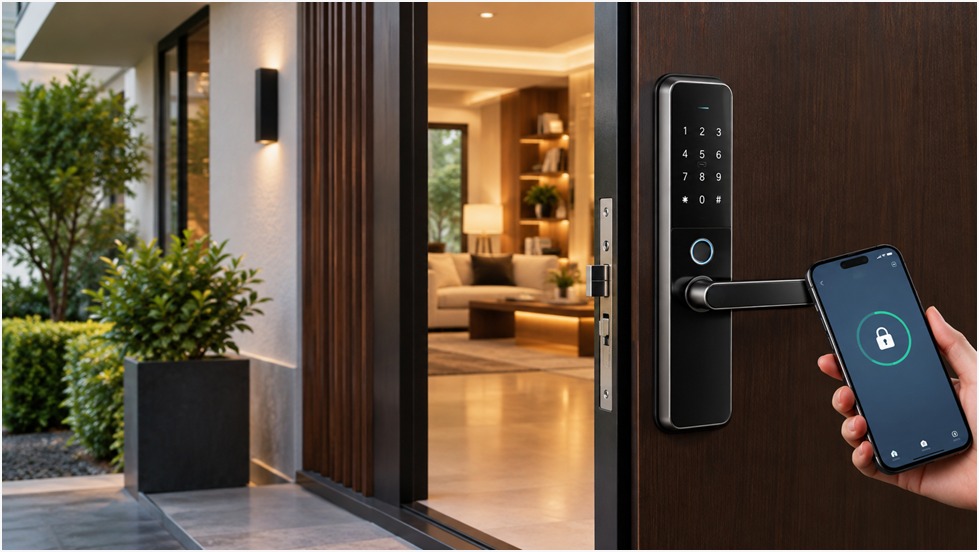
How Do Smart Locks Operate Without Keys?
A smart lock works without a traditional key by swapping the metal cut you're used to for an electronic way of proving who you are. Once the system confirms you're authorized — through a PIN, a fingerprint, a card, or a smartphone — a small motor or actuator inside the unit releases the bolt, and the door opens. No brass key, no fumbling at the door in the dark.
This article walks through exactly how that process happens: how a keyless lock verifies a person, what moves inside the housing when it unlocks, what happens if the battery dies, and how secure keyless entry really is compared with a standard deadbolt.
What Is the Real Operation of a Keyless Door Lock?
At a basic level, every keyless door lock follows the same sequence, regardless of brand or price point:
- You show a credential, such as a phone signal, fingerprint, card, or PIN.
- The lock's internal controller checks that credential against what's stored in its memory.
- It approves or denies the request.
- If approved, an electronic mechanism inside the lock engages.
- The door opens when the bolt or latch retracts.
- The lock re-secures itself, either immediately or after a short delay, depending on how it's configured.
The details differ between models — some use a small motor, others use a solenoid-driven latch — but the underlying logic is consistent across almost every electronic door lock on the market.
How Can a Door Be Unlocked Without a Conventional Key?
This can be done in a variety of ways. Most keyless entry systems offer more than one method, and which one suits a property depends on who's using the door and how often.
PIN or Password Access
A keypad lock lets you enter a numeric code programmed into the system. It's simple and doesn't rely on carrying anything physical. One thing worth flagging from real-world use: people tend to pick PINs that are easy to guess — birthdays, repeated digits, sequential numbers. A less obvious code makes a real difference, and most units allow one of reasonable length.
Fingerprint Access
Fingerprint door locks scan the ridge pattern of a finger and compare it against fingerprint data enrolled earlier. If the scan matches closely enough, access is granted. It's worth being upfront here: biometric readers aren't infallible. Sensors can misread a wet or dirty finger, and enrollment quality matters. That's a reasonable trade-off for convenience, not a guarantee of perfection.
RFID Cards and Key Tags
An RFID door lock reads a short-range signal from a card or tag held near the reader. What makes this useful in shared spaces — offices, rental units, hotel rooms — is that access can be added or removed instantly without changing the lock itself. Lose a card, and the property manager simply deactivates it and issues a new one.
Smartphone Access
Many digital door locks now pair with a smartphone over Bluetooth, and some connected systems add Wi-Fi or cloud access for remote control. This lets an authorized phone unlock the door within range, or in some cases from anywhere with an internet connection. Exactly which features are available — remote unlocking, activity logs, guest access depends on the specific product, so it's worth checking before assuming a feature exists.
Multiple Access Methods
It's common for one unit to support several of these methods at once. A smart lock that combines PIN, fingerprint and RFID isn't redundant — it's practical, since phones die, cards get left behind, and PINs get forgotten. A family might use fingerprints daily with a backup PIN for guests. A short-term rental might issue a temporary PIN that expires automatically after checkout. An office might pair RFID badges for staff with a manager-only PIN for after-hours access.
What Happens Inside the Lock When You Unlock It?
Once a credential is accepted, the sequence inside the housing is mechanical, not magical. The controller sends an authorization signal to a motor or actuator, which physically drives the locking bolt or latch, retracting it from the door frame. The door becomes accessible the moment that movement completes. Everything before that point — checking the PIN, matching the fingerprint, reading the card — is authentication. The physical locking mechanism is responsible for everything that follows. They're two separate systems working together, and the distinction matters when troubleshooting a lock that won't open: is it rejecting the credential, or is the motor struggling?
Is Wi-Fi Required for a Smart Lock to Function?
Not always. This is one of the most common misunderstandings around electronic locks. A standalone keypad or fingerprint lock can operate entirely on its own, with no internet connection required for day-to-day unlocking. Bluetooth-based locks work locally too, communicating directly with a nearby phone.
Wi-Fi or cloud connectivity becomes relevant when you want remote features — unlocking the door from another city, checking who came in and when, or issuing a temporary code without visiting the property. Basic access, in most cases, doesn't depend on the internet at all.
What Happens When the Battery Runs Out?
This is a fair concern, and a well-designed smart lock accounts for it. Common backup options include an external contact point where a portable power source can be connected temporarily, a mechanical key override on models that include one, or a secondary access method that draws less power. Some units also warn you well before the battery gets critically low.
That said, the exact emergency procedure varies by manufacturer and model. It's worth reading the installation manual before fitting the lock, not after you're locked out.
Is Keyless Access Secure?
Reasonably, yes — but security depends on more than the electronics. A well-managed access credential system lets you assign unique PINs, remove access for a former tenant or employee instantly, and, on some models, review an activity log of who entered and when. None of that is possible with a shared metal key.
That said, a smart lock is only as strong as the door it's fitted to and the habits of the people using it. Weak installation, a PIN shared too widely, an unattended phone with saved access, or outdated firmware all weaken the setup. No system — mechanical or electronic — is impossible to bypass. Keyless entry mostly shifts the conversation from "who has a copy of the key" to "who has access to the credential," which is easier to manage but still needs attention.
Where Are Keyless Door Locks Commonly Used?
Digital door locks show up in homes, apartments, offices, hotels, short-term rentals, retail spaces, and broader smart home setups. The right access method depends on the number of people using the door, how often access needs to change, and the level of control the owner wants. A family home might need nothing more than a smart lock with a fingerprint reader and a PIN backup. A hotel needs bulk-issued, auto-expiring credentials for hundreds of guests a month.
Before selecting a digital door lock, what should you look for?
Before installing an electronic lock, it helps to confirm:
- Door compatibility with the lock's mounting requirements
- Whether it's a deadbolt, lever, or mortise-style mechanism
- Which access methods it supports
- Expected battery life and low-battery warnings
- What emergency access options exist
- Whether it's rated for indoor or outdoor exposure
- How many users and credentials it can store
- How easy access is to add or remove.
- What the installation actually involves
- Warranty coverage and after-sales support
Conclusion
A smart lock works by replacing a physical key with an authentication step and an electronic locking mechanism that responds once that step is verified. PINs, fingerprints, cards, and phones are just different ways of answering the same question the lock asks: is this person allowed in? The right setup depends on the door itself, how many people need access, what backup options are available, and how the property is actually used day to day. It's worth thinking through those details before installation, not after.
